Watchlist
The Watchlist lets you track ETFs with at-a-glance metrics — concentration, top sectors, portfolio overlap, and data freshness — all in a single dashboard.
Access: Navigate to Workspace → Watchlist in the sidebar.
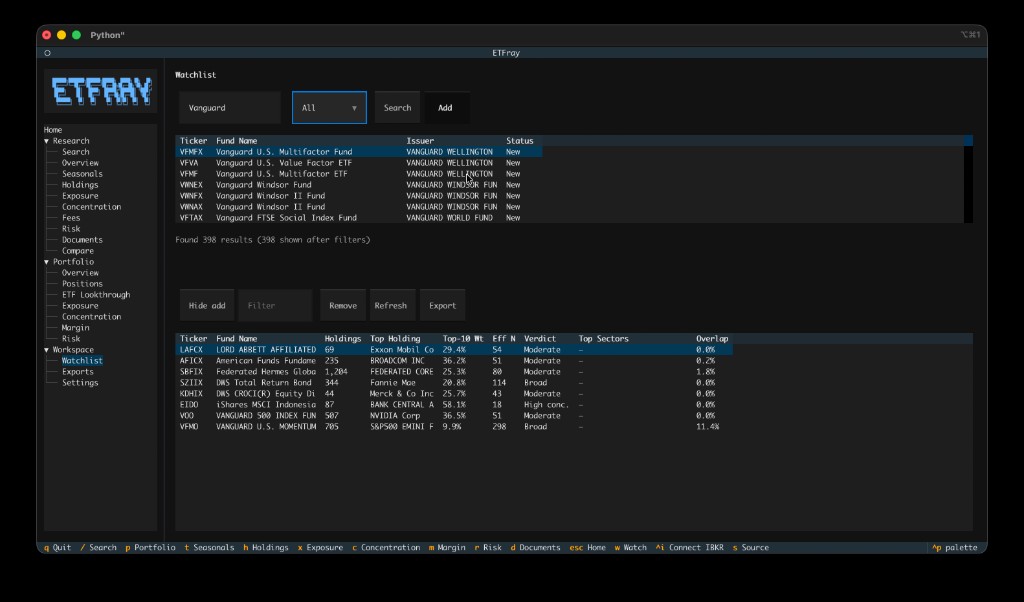
Overview
The Watchlist table shows one row per tracked ETF with these columns:
| Column | Meaning |
|---|---|
| Ticker | ETF ticker symbol |
| Fund Name | Fund name (from EDGAR cache) |
| Holdings | Number of holdings in the fund |
| Top Holding | Largest single position name |
| Top-10 Wt | Cumulative weight of the 10 largest holdings |
| Eff N | Effective number of holdings (1/HHI) — how many equal-weight stocks the fund behaves like |
| Verdict | Concentration verdict: Broad, Moderate, or High conc. |
| Top Sectors | Top 3 sectors with approximate weights |
| Overlap | Weight-adjusted overlap vs your IBKR portfolio (if connected) |
| Fresh | Days since the holdings data was last reported |
Adding ETFs
There are two ways to add ETFs to your watchlist:
From any research view
- Search for an ETF (press
/, type ticker, Enter) - Press
wto add the current ETF to the watchlist - A notification confirms the addition
From the Watchlist view
- Click Add ticker to reveal the search panel
- Type a ticker, fund name, or issuer in the search box
- Press Enter or click Search
- Filter results by issuer using the dropdown
- Select a result and click Add (or press Enter on the row)
Tip
Press a while in the Watchlist view to quickly focus the search input.
Filtering
Use the filter input in the toolbar to narrow the watchlist table. It matches against ticker and fund name.
Removing ETFs
- Select a row in the watchlist table
- Click Remove or press
Delete/Backspace - A notification confirms removal with an undo option
Undo: Press Ctrl+Z immediately after removing to restore the ETF.
Opening an ETF
Double-click any row in the watchlist table to navigate directly to that ETF's research view (Overview).
Alternatively, select a row and press Enter.
Overlap Column
When connected to IBKR, the Overlap column shows how much each watchlist ETF overlaps with your current portfolio holdings. This helps you evaluate whether adding a new ETF would actually diversify your portfolio or just duplicate existing exposure.
The overlap is calculated as the sum of minimum weights for all shared tickers between the watchlist ETF and your portfolio's top 5 positions (by market value), weighted by position size.
Note
Overlap requires an active IBKR connection and cached holdings data for your portfolio ETFs. If not connected, the column shows "—".
Freshness Column
The Fresh column shows how old the cached holdings data is:
| Display | Meaning |
|---|---|
12d |
12 days old — recent data |
~75d |
~75 days old — acceptable but aging |
!200d |
200 days old — stale, consider refreshing |
Export
Click Export in the toolbar to save the current watchlist table to CSV. The file is saved to ~/.etfray/exports/watchlist_<timestamp>.csv.
Keybindings
| Key | Context | Action |
|---|---|---|
w |
Global (any ETF view) | Add current ETF to watchlist |
a |
Watchlist view | Focus the search/add input |
Enter |
Watchlist table | Open selected ETF |
Delete / Backspace |
Watchlist table | Remove selected ETF |
Ctrl+Z |
Watchlist view | Undo last removal |