Quick Start
Launch
etfray
The app opens with a splash screen that runs startup checks (database, settings, IBKR connection, cache warmup) and dismisses automatically when complete. If TWS/Gateway is running, IBKR connects during splash; otherwise use Ctrl+I to connect later.
Navigation
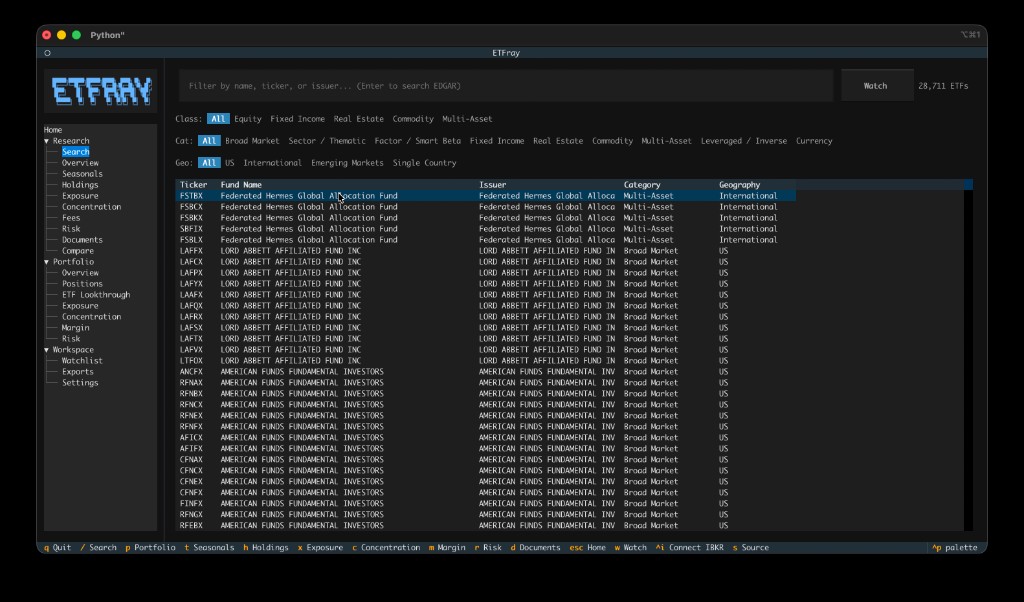
- Sidebar tree — Use the left panel to navigate between Research, Portfolio, and Workspace sections
- Command palette — Press
ctrl+pto search and run any command - Settings — Navigate to Workspace → Settings in the sidebar to configure IBKR connection and data sources
First steps
- Navigate to Research → Search in the sidebar (or press
/) - Type an ETF ticker (e.g.,
VTI) and press Enter - Browse the Overview for fund profile and key metrics
- Press
tto view Seasonals — year-over-year return chart and period returns - Use
h,x,cto jump between Holdings, Exposure, and Concentration - Press
wto add the ETF to your Watchlist
Watchlist
Navigate to Workspace → Watchlist to see all tracked ETFs with concentration metrics, top sectors, and portfolio overlap at a glance. Double-click any row to open that ETF's research view.
Portfolio analytics
To use portfolio features, you need IBKR TWS or IB Gateway running. See IBKR Setup for details.
Key shortcuts
| Key | Action |
|---|---|
/ |
Search ETFs |
t |
Seasonals |
w |
Add to watchlist |
h |
Holdings |
x |
Exposure |
c |
Concentration |
p |
Portfolio |
ctrl+p |
Command palette |
q |
Quit |
See Keybindings for the full list.